Configuring Your Portal
Mailchimp integrations settings can be found below
Portal Management
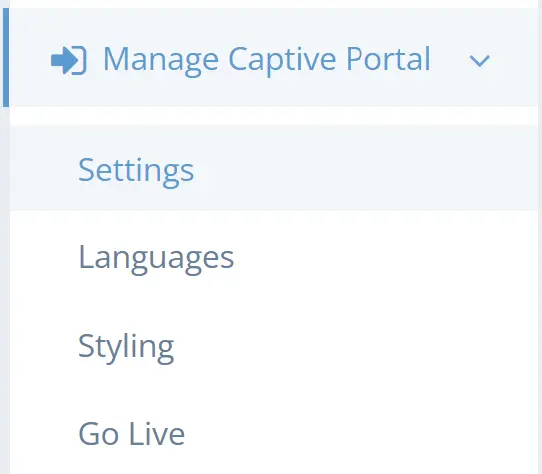
Manage your portal by navigating to Manage Captive Portal in the left navigation menu.
Settings | The settings menu allows you to modify the required information that users must provide to authenticate onto your guest network. |
Languages | The languages menu allows you to create additional language templates to communicate with your users. |
Styling | The styling menu provides options for branding the portal to your business. |
Go Live | Go Live reads the configuration of your Unifi console and confirms that the requires settings are correct. |
It is recommended that any settings changes be handing by the Low Voltage Consulting technical team. Setting modification is safe - but the wrong modification may break access to the portal. If you experience this problem contact the team at Customer Care.
Settings
The LVC Captive Portal provides many options for user authentication. Check these settings to enable:
- Facebook Login
- Instagram Login
- Azure AD Login
- Registration Form
- First Name
- Last Name
- Postal Code
- Email Address
- Phone Number
- and up to 4 custom fields
- Sponsored Access
- Anonymous Login
- PMS Login
- Generic Oauth 2.0
- Time Specific LVC Portal Vouchers
- Unifi Vouchers
Mail Chimp Integration
When enabled and configured correctly, the Mailchimp integration automatically adds each collected email address (as well as first and last name if provided) to the selected Mailchimp mailing list immediately after the registration has been processed. Email addresses can either be collected using a Social login option (excluding Instagram) or the Registration form with the email field enabled.
Please contact Customer Care to setup your integration.
Terms of Service, Privacy Notice
When these options are enabled, users are asked to explicitly accept the Terms of Service and/or Privacy Notice respectively before they can proceed.
If vouchers are enabled, these options also influence the behaviour of the "I have a code" button. Users need to accept the Terms of Service and/or Privacy Notice before proceeding to enter their voucher code.
However, in scenarios where the "I have a code" button is only used for entering one-time passwords for email or phone number verifications, these options do not alter its behaviour. In such cases, users will have already accepted the Terms of Service and/or Privacy Notice.
Marketing Consent
When this option is enabled, users are asked to provide explicit consent on the registration form or before connecting to the Social Auth provider (Facebook, Instagram, Azure AD) whether their personal data may be used for marketing purposes.
A user's marketing consent is visible in the Registrations reports. The default value of marketing consent is no.
When this option and the Mailchimp integration are both enabled but a user has not provided explicit marketing consent, the collected information (first name, last name, email address) is not passed on to Mailchimp.
Please make sure to honor the user's selection for marketing consent!
Styling
If you are dissatisfied with the styles of your Captive Portal - please reach out to our team.
However - settings found here can be modified as you desire.
Go Live
Most of the Go Live settings will be locked - you can modify the redirection mechanism used for the portal - but it is not recommended.
There are no comments for now.
to be the first to leave a comment.